LinkedIn rental (aka LinkedIn account rental) is a structured way to operate outreach or market validation from permissioned, identity-verified profiles — without hiring new staff or building accounts from zero. Teams use LinkedIn rental services to:
- Add capacity quickly across regions or languages
- Run controlled experiments (different ICPs, offers, or messaging styles)
- Meet surge demand during campaigns or launches
- Keep operations flexible — spin seats up, pause, or swap when markets shift
You can also buy LinkedIn accounts for a long-term in-house pool. Both models can work; the choice is operational and financial, not ideological.
Buy vs Rent LinkedIn accounts
Takeaway: If speed, elasticity, and a safety net matter, LinkedIn rental offers a built-in replacement opportunity and support via SLAs. If you buy LinkedIn accounts, confirm exactly what after-sales support looks like.
How to Rent LinkedIn Account Seats in 2025
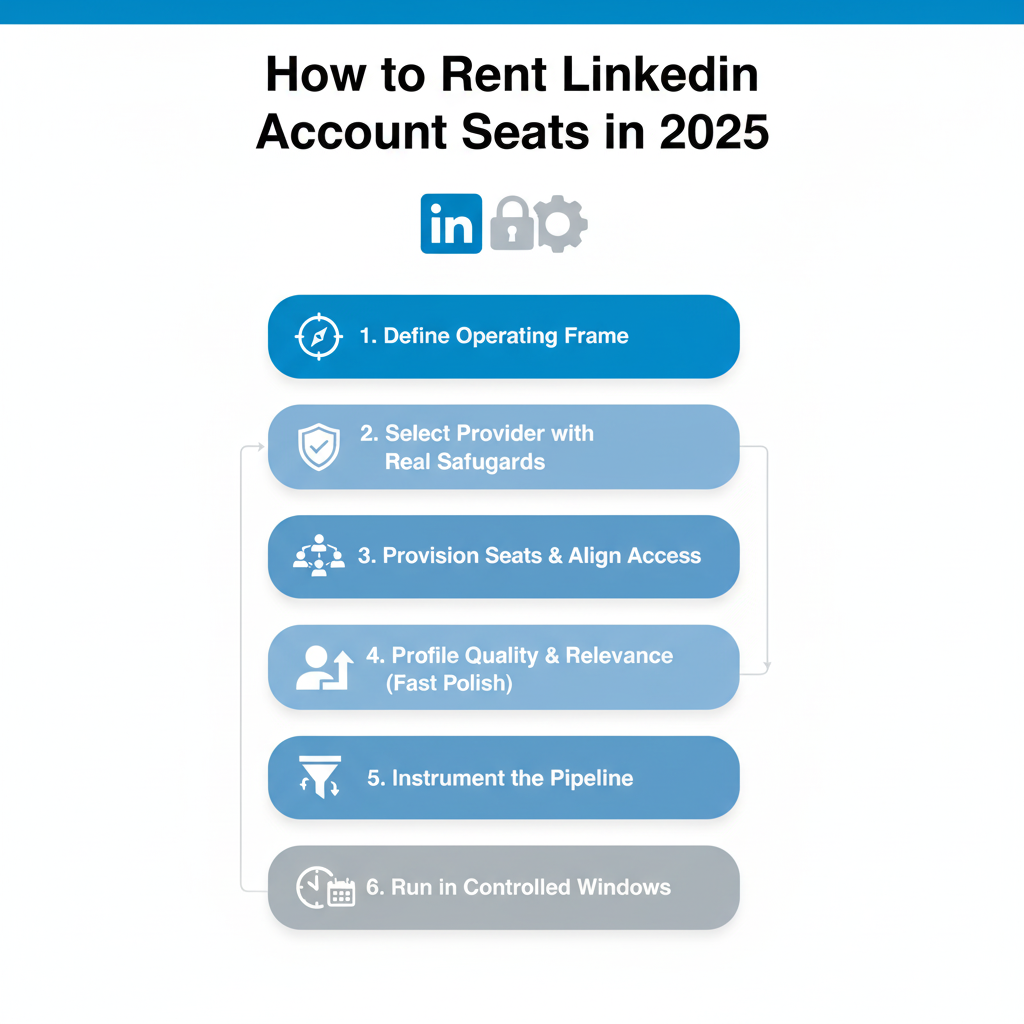
Define the operating frame
- ICP, regions, languages, and estimated daily capacity per seat.
- Data flows: where lists come from, how replies get routed, how meetings are logged.
Select a provider with real safeguards
- Identity verification (e.g., official document/NFC-passport checks), 2FA, device isolation, usage oversight, replacement SLA, and hands-on support.
Provision seats and align access
- Clear credential custody, role-based permissions, password manager, and incident response.
- Decide who can view/export conversations and when.
Profile quality & relevance (fast polish)
- Consistent photo and headline that fit the region/role.
- About/Experience tailored to the ICPs you’ll contact.
- Location/time zone aligned with the target market.
- Featured section with one helpful resource.
Instrument the pipeline
- Tags/UTMs for campaigns, seat-level dashboards, and CRM sync.
- Acceptance %, first-reply %, meeting rate, opt-outs, and response SLAs.
Run in controlled windows
- Business hours in the recipient’s time zone; batch windows that look human.
- Iteration cycles (copy/list review every 3–5 days).
Provider Due Diligence: A 10-Point Checklist
Pricing Models (What you’ll actually see)
- Per seat/month: standard for LinkedIn rental services; tiers by region or profile maturity.
- Bundles/commitments: multi-seat or multi-month discounts.
- Outcome-linked pilots: short pilot with defined KPI targets (acceptance or reply rate).
Measurement: The four KPIs that matter
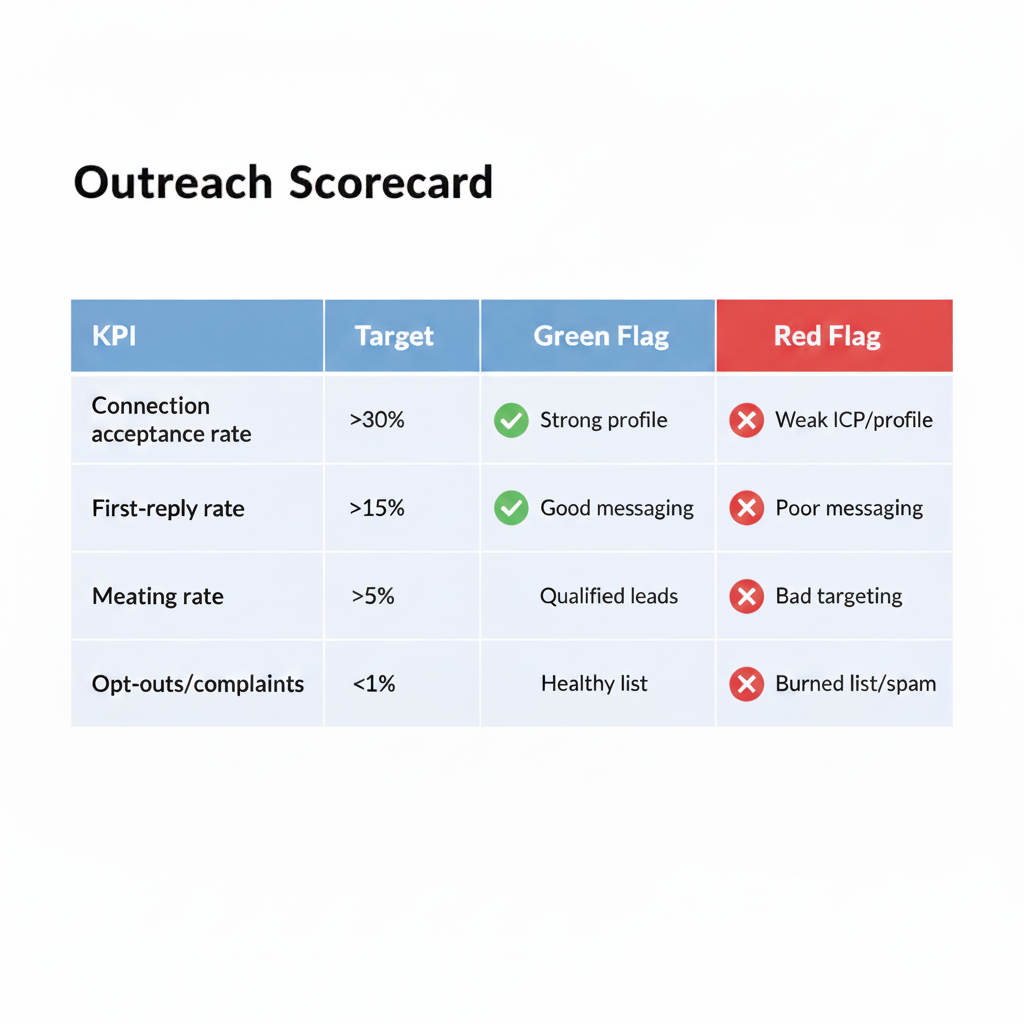
- Connection acceptance rate – reflects fit and profile credibility
- First-reply rate – an early signal of message relevance and timing
- Meeting rate – downstream quality indicator (avoid vanity volume)
- Opt-outs/complaints – leading signal for risk and copy/list mismatch
Legal, Policy, and Risk Notes
- Keep outreach value-first, relevant, and respectful of privacy laws in each region.
- Align with platform policies; avoid deceptive identity or misleading claims.
- Maintain audit trails (who sent what, from which seat, when).
- Document incident response: rate-limit warnings, user complaints, or seat restrictions.
Operational Patterns That Work
- ICP-first mapping: one seat per ICP variant or per region to keep context coherent.
- Copy swimlanes: 2–3 versions per ICP; retire the lowest performer weekly.
- Calendar hygiene: book in the recipient’s timezone with a short, specific ask.
- Handoff clarity: SDR/Founder/AM — who owns replies? Define SLA for response handoffs.
- Post-reply depth: have a one-pager, checklist, or short deck ready—no heavy attachments on first contact.
Start booking calls today!
Rent LinkedIn accounts with connections with LinkUnity for speed and elasticity. We provide ID-verified profiles (official badge) with 2FA in clean, isolated environments, prepped with steady warm-up and built-in replacements/recovery if restrictions occur.
FAQs
Is LinkedIn rental only for big teams?
No. It’s about operational discipline, not headcount. Even small teams rent LinkedIn accounts for a region-specific test.
What’s the risk of a seat being restricted?
Any outreach program has risk. That’s why provider replacement & support terms matter — ask for written SLAs and examples.
Will rental affect our brand voice?
It shouldn’t. Use aligned headlines, About sections, tone guides, and saved replies so conversations feel authentically yours.